

ProductPipeline
Sales pipeline where each deal is a place
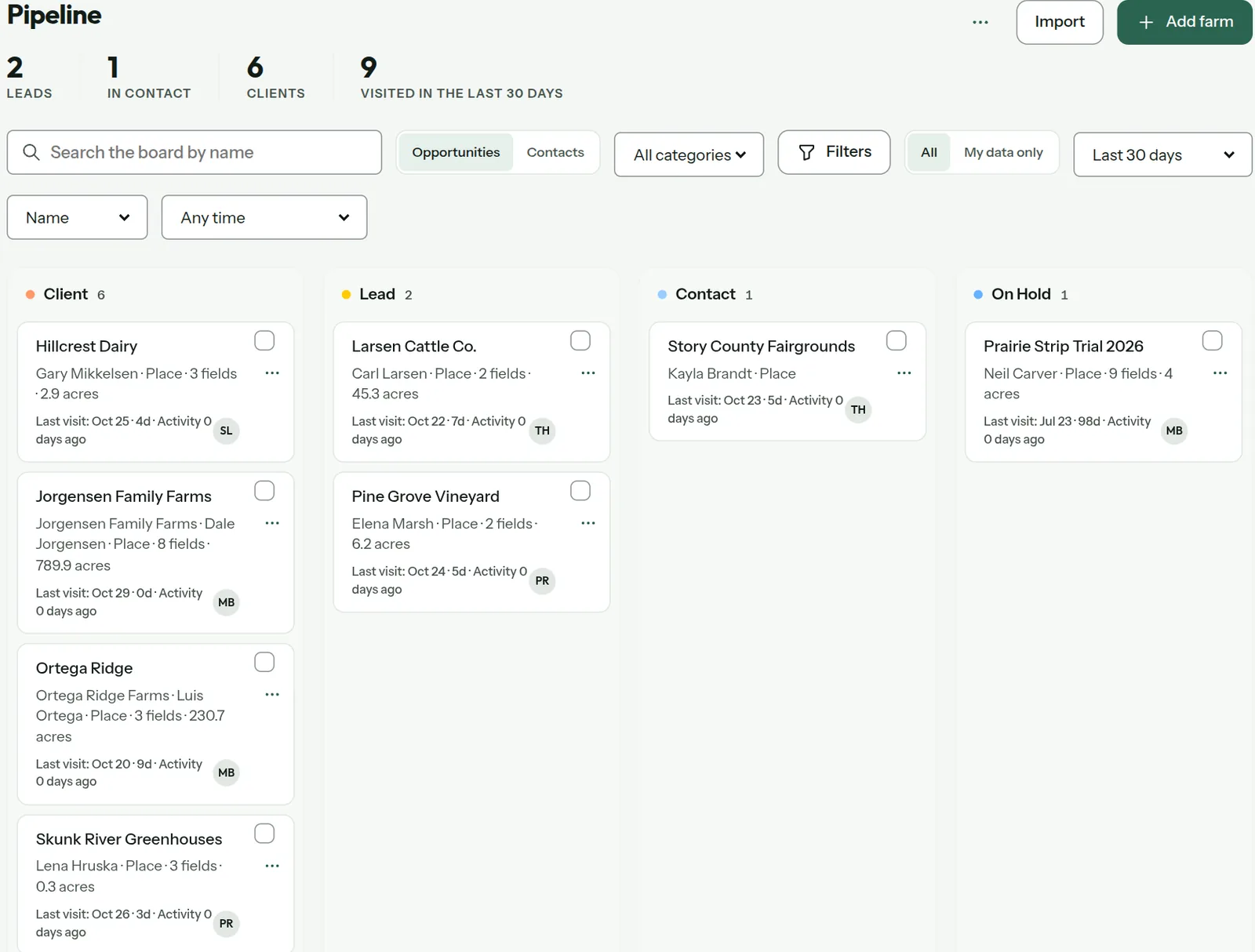
PropelMapper's pipeline is the Board grouped by your sales statuses.

Sales visits to farms
A rep selling to livestock operations does not sell to a company in an office park. They sell to a hog site at the end of a gravel road, a cattle operation a couple of counties over, a family with several barns and one decision maker.
Generic CRMs treat that as an address field. We think the place should be the record. When the deal is the dairy, the pipeline card should open on the dairy: its barns, the last herd visit, the photo of the feed bunk, the owner and the son who now makes the calls.
So in PropelMapper the pipeline is made of places, and it lives on the Board. Every farm sits in a status your team defines, from lead to in contact to client, and moving it to the next stage is a drag.
Pipeline note: what you said and what the report says
A rep's note after a first visit to a dairy that is not a customer yet.
“First visit at Hillcrest. Gary's happy with his current supplier but the fresh pen numbers aren't great. Leave him as in contact, I'll bring a ration comparison next month.”
Pipeline note - Hillcrest Dairy
At a glance
First visit. Owner satisfied with current supplier; fresh pen performance is a concern. Stage: in contact. Next step: bring a ration comparison next month.
Observations
First visit. Owner satisfied with current supplier; fresh pen performance is a concern. Stage: in contact. Next step: bring a ration comparison next month.
After your review
Example account: Prairie Agronomy
Board analytics and conversion
Analytics, in the Board's menu, counts the places in each stage, as a table and as a bar for each status. Set the conversion period to the last 30, 90 or 365 days. An admin marks which status counts as won by ticking Counts as converted, so the definition is yours and it stays the same all season.
Filter by last contact for the leads with no contact yet, or none in the last 30 days. Those two lists are usually the week's work.
Selling to places or contacts
Switch the Board between Opportunities and Contacts. Some teams sell to a farm, some sell to a person who runs three of them. Add a farm from the same page, or import a list to start, and every new place lands in the team's default status.
One Board for sales and operations
The pipeline is the Board. Group it by status for sales stages, or by category for the kind of work, such as dairy, row crop or greenhouse. Older links to Pipeline in the app open the Board. There is one set of cards, so nothing needs to be kept in sync.
Moving deals forward after visits
The pipeline moves because of visits, so the two sit together. Finish a call at the dairy, say the next step in your voice note, and it comes back as a task on that place for you to confirm. Open the card and the visit, the task and the stage are on the same page.
When you drag the card forward, the farm's history records who moved it and when, so a manager can see how a deal progressed without asking. A slip of the mouse is one Undo away. Select several cards to move a whole group after a field day where you met a handful of prospects at once.
Questions about the pipeline
Does the pipeline track deal values?
No. The Board tracks places and their status, owner and activity, and Board analytics counts places per stage without money values. Accounts group the people and places of one operation.
Who it’s for
Livestock nutrition and genetics sales teams, seed and crop protection reps, and vet practices growing a client list, anywhere the customer is a farm and the sales call is a visit.